
Post Type Relationships
Steps to Associate Post Types
Video Link: https://www.youtube.com/watch?v=WpALzRZ-MaY
Have 2 Post Types: Parent & Child
01 – Parent – Create Post Relationship Field, determine relationship, create Custom Relation Key
02 – Child – Create Post Relationship field, determine relationship, use SAME Custom Relation Key that you created in Step 1
03 – Parent – Display Children – Open Parent Post Type in Elementor, Insert Post Feed option, Set Filters to match the Child, Set # of posts to display and activate the Load More button.
To retrict posts to only the Children associated to a Parent, go back to the Child Post type and access Filtering. Add a Post Relation Filter and select the Parent Data Source and Save Changes.
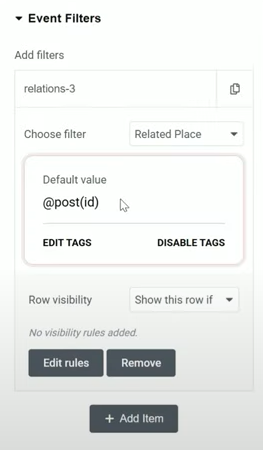
Reopen the Parent in Elementor and goo to the Event Filters section, Add Filter and select the filter you just created in the Child Post Type. Enable Voxel Dynamic Tags and set the default to post(id)
How to hide the child section if there are no child posts
Use Voxel Visibility to hide section if there are no events